
How DDoS protection works
Always-on filtering, attack reports and firewall rules.
2 Apr 2026 · 3 min read
Every server at DeluxHost is protected against DDoS attacks from the moment it goes online. There is nothing to switch on and no extra plan to buy: filtering is always active in Amsterdam, Frankfurt and Eygelshoven. This post explains what happens when an attack hits and how you can see and tune it yourself.
Always-on filtering
All traffic heading to your IP passes through our scrubbing layer before it reaches the server. Clean traffic goes straight through with no measurable delay. When the system spots an attack pattern, it starts dropping the malicious packets while legitimate visitors and players keep connecting as normal.
Because filtering is always on, there is no "detection delay" where your server sits offline while protection kicks in. Most customers only find out about an attack by reading the report afterwards.
What gets filtered
| Attack type | Example | How it is handled |
|---|---|---|
| Volumetric | UDP floods, amplification (DNS, NTP, memcached) | Dropped at the network edge |
| Protocol | SYN floods, fragmented packets | Filtered by connection validation |
| Game specific | Query floods against game ports | Filtered by game aware profiles |
| Application (L7) | HTTP floods | Mitigate with your own rate limits and a CDN |
Application layer attacks look like real visitors, so they are best handled closer to your app. A reverse proxy with rate limiting, or a CDN in front of your website, works well alongside our network protection.
Watching attacks in the Firewall page
Open Firewall from the sidebar. You will find three tabs:
- Overview: the current protection status and a quick summary of recent activity.
- Rules: your own allow and block rules, applied at the edge before traffic reaches the server.
- Attacks: every mitigated attack with its start time, duration, peak and vectors.
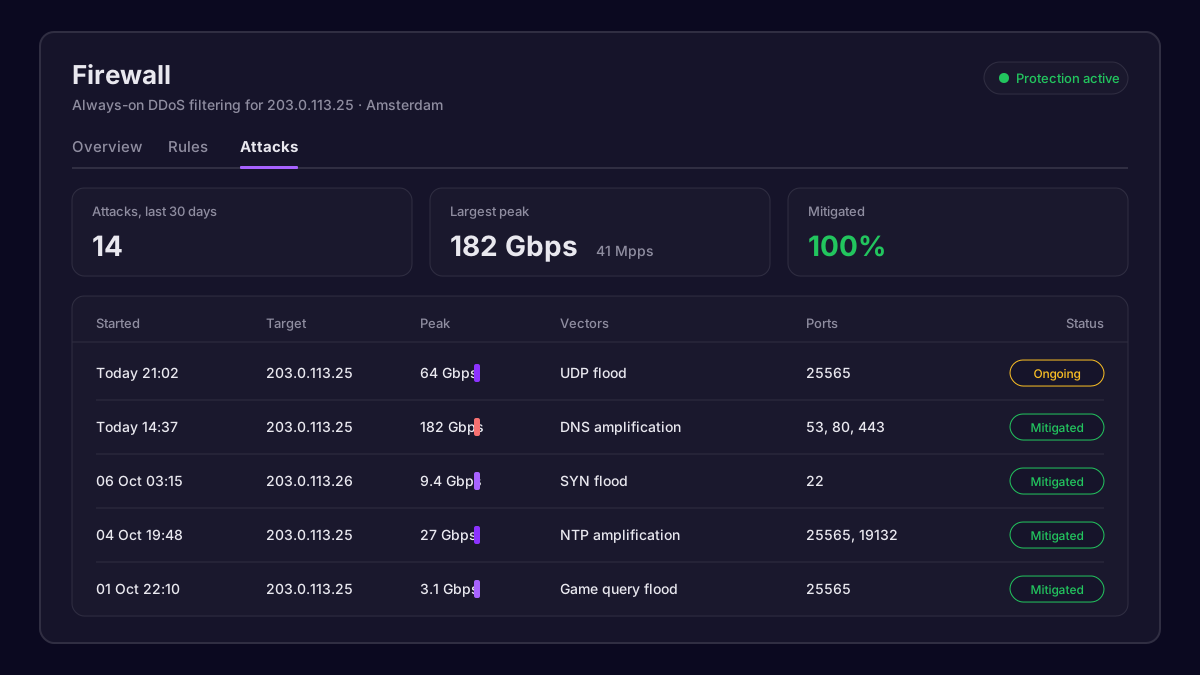 The Attacks tab listing recent mitigated attacks
Tip: If your game server or app only needs a handful of ports, add rules that allow those ports and block the rest. Less open surface means attacks have less to hit, and filtering gets even more precise.
Writing good firewall rules
Rules are checked from top to bottom, and the first match wins. A sensible setup for a Minecraft server might look like this:
1  allow  tcp  22      from 203.0.113.10   (your home IP, SSH)
2  allow  tcp  25565   from any            (game)
3  allow  udp  19132   from any            (Bedrock)
4  drop   any  any     from any
Always add your SSH or RDP rule first, so you never lock yourself out. If you do, you can still reach the server through the VNC console on its service page.
When to contact us
The protection handles the vast majority of attacks without anyone noticing. Open a ticket from Support if:
- Your server stays unreachable during an attack shown in the Attacks tab.
- Legitimate traffic is being dropped (for example players timing out only during mitigation).
- You run a custom protocol on unusual ports and want a tailored filter profile.
Include the attack time from the report and the affected port, and our network team can tune filtering for your service.
Our team answers within minutes, 24/7.