
High latency or packet loss
Collect the data our network team needs to fix a route.
21 Apr 2026 · 2 min read
Lag, rubber banding in games, or SSH sessions that freeze for a second at a time are usually caused by latency or packet loss somewhere along the route between you and your server. These issues are often outside both your network and ours, at a carrier in between. The good news: with the right data, our network team can usually reroute traffic around the problem.
First, confirm it is the network
Before collecting route data, rule out the server itself. Open the service page and check the Usage tab:
- CPU near 100%: the server is overloaded, not the network. Players and visitors feel this as lag too.
- Network graph flat at the plan limit: you are saturating your port.
- Everything normal: time to look at the route.
Tip: Test from a second location, such as a friend's connection or a phone hotspot. If only one ISP shows the problem, it is almost always a routing issue we can work around.
Run an MTR report
MTR combines ping and traceroute. It shows every hop between you and the server, and how much loss and latency each one adds. We need a report taken while the problem is happening, in both directions if possible.
On Linux or macOS:
mtr -rwzbc 100 your-server-ip
On Windows, use WinMTR (a free download) or the built-in pathping:
pathping -n -q 100 your-server-ip
Then run the reverse test from your server back to your home IP, using the VNC console or SSH:
mtr -rwzbc 100 your-home-ip
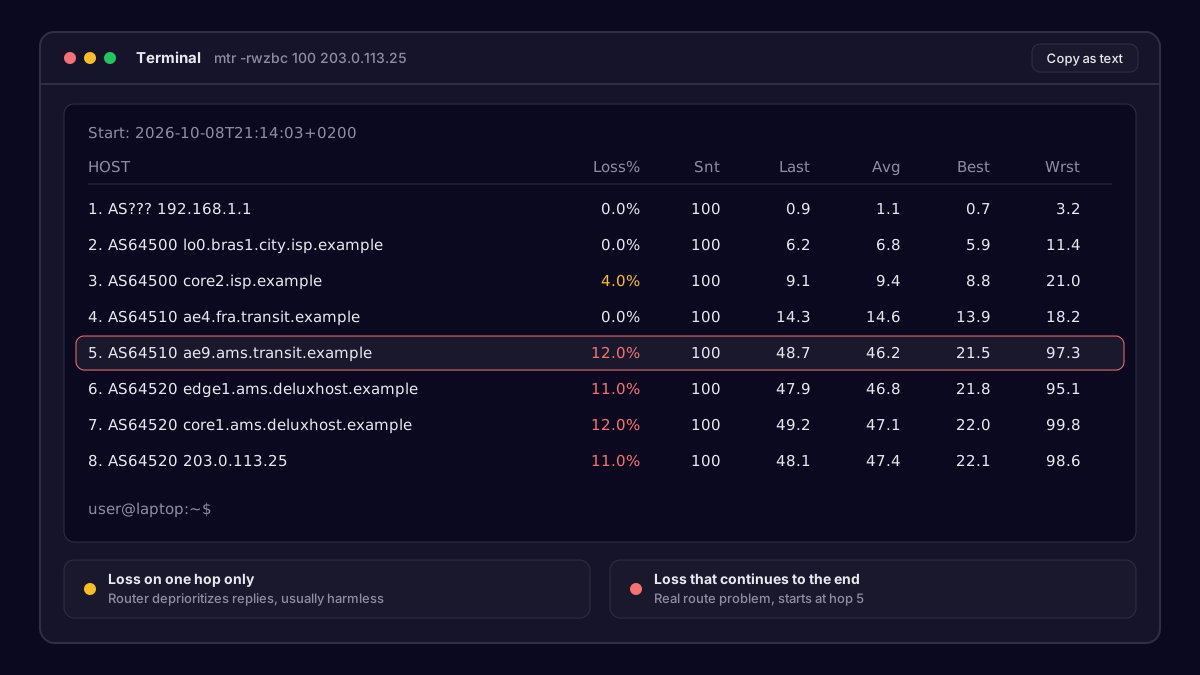 An MTR report showing packet loss at one hop
Reading the report
A few things trip people up when reading MTR output:
- Loss on a middle hop that does not continue to the following hops is usually harmless. Routers often deprioritize replies to MTR itself.
- Loss that starts at one hop and continues to the final hop is the real problem.
- A big jump in latency between two hops, staying high afterwards, often points to traffic taking a long detour.
What to send us
Open a ticket from Support with Open ticket and include:
- The full MTR output from your side and from the server side, pasted as text.
- Your public IP and your ISP name.
- The time the test was taken, with your timezone.
- Whether the problem is constant or only at certain hours.
Screenshots are fine, but plain text lets our engineers search and compare hops much faster.
What happens next
Our network team checks the hop where loss begins. If it is inside our network in Amsterdam, Frankfurt or Eygelshoven, we fix it directly. If it is at a carrier, we can often shift traffic to a different upstream for your prefix, or open a case with that carrier. We will keep you posted in the ticket and may ask for a fresh MTR after a change, to confirm it really is better.
Our team answers within minutes, 24/7.