
Reinstall the operating system
Wipe the disk and start again from a clean image.
4 Mar 2026 · 2 min read
Sometimes the fastest way forward is a clean slate. A reinstall wipes the disk and puts a fresh operating system image on your server in a few minutes, keeping the same IP addresses and the same plan. It is perfect when an experiment went wrong, when you want to switch distribution, or when you are handing the server to a new project.
Before you start
A reinstall is permanent. Every file, database and user on the disk is erased and cannot be recovered by our team. Take a moment to:
- Copy anything you need to your own computer or to another server.
- Export databases with
mysqldumporpg_dump. - Note down any custom firewall rules or cron jobs you want to recreate.
# quick backup of a web root and a database before wiping
tar -czf site-backup.tar.gz /var/www
mysqldump --all-databases > all-databases.sql
scp site-backup.tar.gz all-databases.sql you@your-pc:~/backups/
Tip: Your IP addresses, reverse DNS records and Firewall rules in the panel are not touched by a reinstall. Only what is on the disk changes.
Running the reinstall
- Open your server and go to the Advanced tab.
- Choose Reinstall operating system.
- Pick an image: Linux distributions and Windows Server versions are listed with their release.
- Set a hostname and choose how you want to log in: a root password, an SSH key, or both.
- Type the server name to confirm, then press Reinstall.
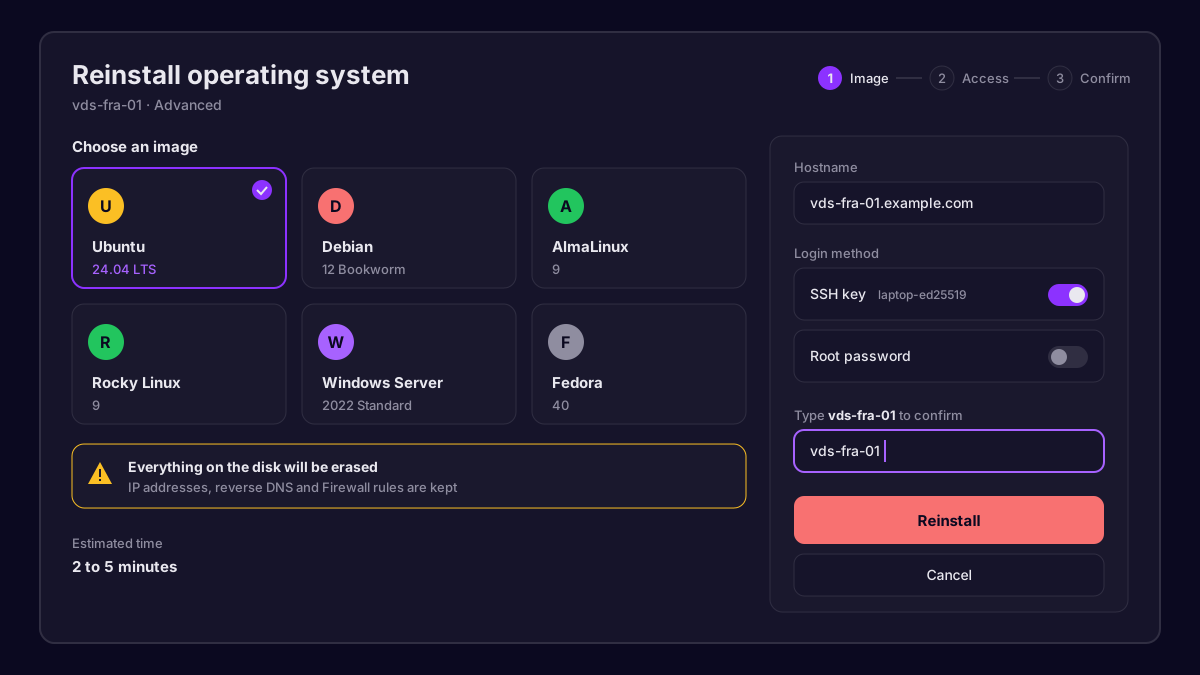 The reinstall wizard with an operating system selected
The server powers off, the disk is wiped and the new image is written. Most Linux images are ready in two to five minutes; Windows takes a little longer because it runs its first setup on boot.
Following the progress
The Activity tab shows each step as it happens. You can also open the VNC console from the Controls card to watch the first boot live, which is handy for Windows where the first start can take a while.
Choosing an image
| Image family | Good for | Login |
|---|---|---|
| Ubuntu LTS / Debian | Web apps, Docker, general use | root password or SSH key |
| AlmaLinux / Rocky | cPanel style stacks, RHEL tools | root password or SSH key |
| Windows Server | RDP desktops, .NET, game tools | Administrator password |
If you are not sure, pick the latest Ubuntu LTS. It has the widest documentation and the longest support window.
After the reinstall
Connect with the new credentials and do the basics before anything else:
apt update && apt upgrade -y
adduser deploy
usermod -aG sudo deploy
Then restore your files and databases, recreate your services and you are back in business. If the server does not come back online after ten minutes, check the Activity tab for an error and open a ticket from Support with the time you started the reinstall.
Our team answers within minutes, 24/7.